

How can we help you?
How can I change my booking?
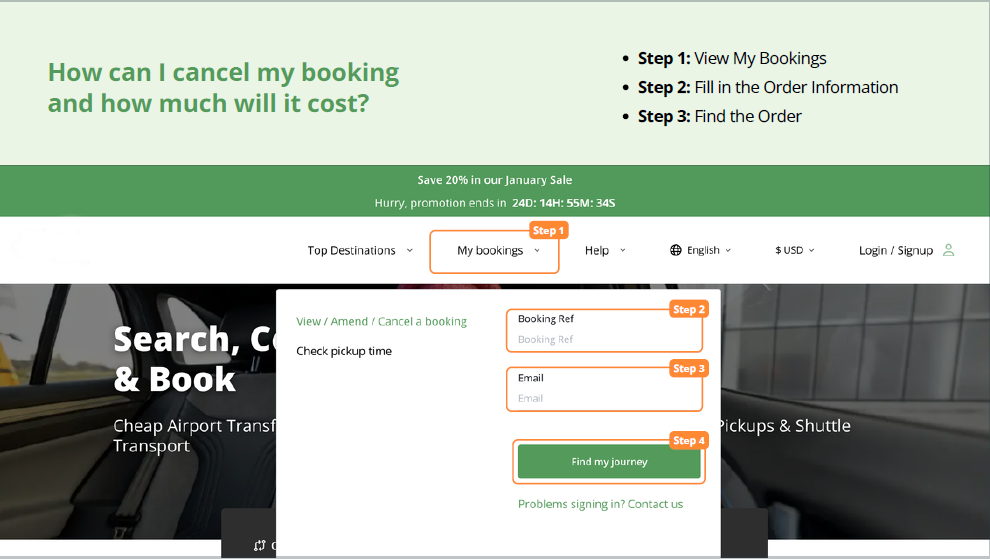
You can easily make changes to your booking through the My Bookings section on the Tikiwini website.
1. Travelling in more than 48 hours?
You can access your booking anytime and make changes directly online.
2. What can you modify?
Depending on your booking, you can update the following details:
- Cancel your booking
- Add or update passengers
- Upgrade your vehicle type
- Change the lead passenger name
- Update flight details (time, number, airline)
3. Changes within the same city
Most updates can be made up to 24 hours before your travel time.
4. Changing destination or city
If you need to change to a different destination or city, you will need to cancel your booking and create a new one.
Important:
After making changes, you will receive a new booking confirmation with the updated details.
After making changes, you will receive a new booking confirmation with the updated details.
Extra charges:
If your changes affect the price, any additional cost will be clearly shown before confirmation.
If your changes affect the price, any additional cost will be clearly shown before confirmation.
Managing your booking is quick and simple with Tikiwini — giving you full control over your trip.
Not finding what you are looking for?
Chat with us or send us an email.
© 2026 Tikiwini Helpdesk